
Formulary
A formulary is the list of prescription medications covered by your insurance plan.
It includes both generic and brand-name drugs chosen by doctors and pharmacists for safety, effectiveness, and value.
Search the formulary by drug name to see coverage, tiers, restrictions, quantity limits, and whether or not they are on the $0 prescription list.
Note: This formulary is for members with Individual or Small Group plans only. Search here for Large Groups.

$0 Prescriptions
Mountain Health Co-Op offers hundreds of $0 prescriptions to help you manage your health more affordably.
These are called Value Preventive Drugs (also known as the $0 Prescription or VBID list).
View the current list of these medications by searching the formulary and following the key.
Or view to download as a PDF:
$0 Drug Categories
You may be able to get your medication for $0 out-of-pocket if you take medications in one of these categories:
- Anticoagulant Medications
- Antidepressant Medications
- Blood Glucose Meter
- Bone Medications
- Cardiovascular Medications
- Cholesterol Medications
- Continuous Glucose Monitor
- Diabetic Medications
- Diabetic Supplies
- Diabetic Test Strips
- Respiratory Medications
In addition, the Affordable Care Act (ACA) makes other medications available with no out-of-pocket cost.
Learn more about these medications by searching the online formulary and finding the blue “PREV” symbol.
Get reimbursed if you paid for $0 out-of-pocket medication.
If you have paid out-of-pocket for a prescription that is covered by your plan and need to be reimbursed then you will need to submit a reimbursement form.
If you have questions, please contact RealRx by calling 855-885-7695.
Formulary Key
When viewing the searchable formulary, you can use the key to determine the classification of each medication, including which are available through the Co-Op’s $0 Prescription List (Value Preventive List) and more.
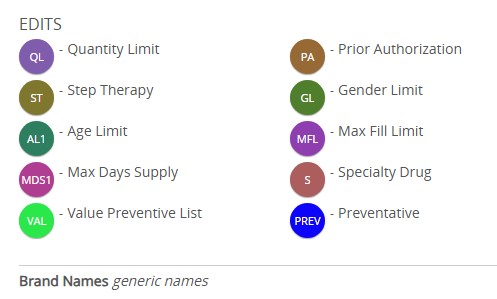
Understanding formulary terms
Value Preventive Drugs are also referred to as $0 out-of-pocket drugs.
These medications are covered even before you meet your deductible or annual out-of-pocket expenses because they are considered preventive.
Preventive health care refers to proactive measures taken to maintain and improve an individual’s overall well-being and prevent the onset of illness or disease.
This means members won’t pay any money out-of-pocket for medications listed in our value-based preventive drug list or labeled with ‘Value Preventive’ on the search tool.
Mountain Health Co-Op has expanded coverage of these medications beyond what is covered at no cost-share ($0 out-of-pocket) under the Affordable Care Act (ACA).
It is available to Mountain Health Co-Op members with Individual Plans, Small Group Employer Plans, and Large Group Employer Plans.
However, your plan may require you to get Value Preventive Drugs via an in-network pharmacy.
Your pharmacy benefit has four drug tiers. These tiers determine your out-of-pocket responsibility and correspond to the copay or coinsurance shown on your benefit summary.
- Tier 1 drugs are preferred generics with the lowest copay.
- Tier 2 drugs are non-preferred generics and preferred brands with a mid-range copay.
- Tier 3 drugs are non-preferred brands with a high copay.
- Tier 4 drugs are preferred specialty drugs (most require prior authorization and must be filled at the Plan’s designated Specialty Pharmacy).
These medications are indicated by the following symbols in the online formulary.
Drugs listed in our $0 Prescription List are available to members no out-of-pocket cost.
Prior authorization helps encourage safe, cost-effective use of prescription drugs by requiring a request form from your physician before the drug will be covered. If PA appears in the Requirements column, the drug requires prior authorization.
QL stands for quantity limits. If QL appears in the requirements column, the drug may be covered by your plan, but only up to a certain quantity or limit. If you need quantities higher than the limit shown, have your provider fax a preauthorization request to us.
SP stands for Step Therapy, a program that requires you to try a lower-cost alternative medication (“Step 1 Drugs”) before using the more expensive (“Step 2”) medication. If it is medically necessary for you to use a Step 2 medication as initial therapy, your provider can submit a formulary exception request to us.
Specialty medications (identified with an “S” in a red-orange circle) treat complex or chronic conditions, such as multiple sclerosis, hepatitis C, and rheumatoid arthritis. They may be taken by mouth, injection, or infusion and often need special handling, so they are not stocked at regular retail pharmacies. In most cases, they must be filled at a designated specialty pharmacy.
Coverage
- Medications given by a healthcare professional are usually covered under your medical benefit.
- Self-administered specialty drugs are covered under your pharmacy benefit as Tier 4 medications.
How to Access Specialty Medications
Your plan generally requires self-administered specialty drugs to be filled through Mountain Health Co-Op’s preferred specialty pharmacy or another in-network one. Many Tier 4 drugs also need prior authorization—your provider can request it using our form or by calling RealRx Pharmacy Customer Service at 855-885-7695.
For your specific copay or deductible, check your Plan Documents in the Member Portal.
Formulary Exception Requests
Sometimes you need access to drugs that are not listed on the plan’s formulary (drug list). These medications are initially reviewed by the Co-Op through the formulary exception review process. The member or provider can submit the request to us by faxing the Pharmacy Formulary Exception Request form Formulary Request Form to 385-425-4052. If the drug is denied, you have the right to an external review.
To make and expedited request, mark “yes” to Question 2 on the Request Form. If you check “yes”, you will receive a response within 24 hours. If you do not check “yes”, you will receive a response within 72 hours.
If you feel we have denied the non-formulary request incorrectly, you may ask us to submit the case for an external review by an impartial, third-party reviewer known as an independent review organization (IRO). We must follow the IRO’s decision.
If you have a Montana plan, a member, member’s representative, or prescribing provider may request an IRO.
Download the Montana IRO form, complete it, and submit it online through the Member Portal Message Center or via mail by sending to:
Mountain Health Co-Op
Attn: Appeals,
P.O. Box 5358
Helena, MT 59604
To request an expedited IRO, check “Yes” under the section for Expedited Request section on page 5 of the form. An expedited request will receive an answer within 24 hours. If you do not request an expedited request, you will receive a response within 72 hours.
If you have an Idaho plan, a member, member’s representative, or prescribing provider may request an IRO.
Click here for instructions, then download and complete the IRO form for Idaho. You may submit your completed form by faxing it to 208-334-4398 or mailing it to:
Idaho Department of Insurance
Attn: External Review
700 W. State St.
PO Box 83720
Boise, ID 83720-0043.
To expedite processing of your IRO, check “Yes” in the Expedited Review section on page 3. An expedited IRO in Idaho will return a decision to you within 72 hours of the request. If you do not request an expedited IRO, the decision will be returned to you within 42 days.
Prior Authorization
Prior authorization (sometimes called “PA”) is a review process your health plan uses before covering certain medications, tests, or treatments.
It is a quick check-in between your doctor and insurance company to confirm a prescription is clinically appropriate, safe, and necessary for you.
Requesting Prior Auth for Pharmacy
Regular prescription prior authorizations can be submitted to RealRx, our Pharmacy Benefit Manager, by using the online form linked to the button below.
Expedited requests: 24 hours
Standard requests: 72 hours
All required documentation must be received prior to processing.
“Expedited” is defined as:
Medications that are needed in a timely or urgent manner that would subject the member to adverse health consequences without the care or treatment requested. Mountain Health Co-Op reserves the right to classify expedited requests as standard requests when this definition is not met.
Medical Pharmacy Claims
If a medication is administered by a medical professional in their clinic or facility, it is usually covered under your health insurance plan’s medical benefits instead of its pharmacy benefits.
Providers can submit prior authorization forms for any medical pharmacy claims to MedCom through the MyCare portal.
For more information regarding prior authorization for medical benefits, please visit our Provider page
Where Prior Authorization Applies
Prior authorization is typically required for:
- Specialty medications
- Brand-name or non-preferred medications
- Non-formulary medications
- Medications with safety, quantity, age or diagnosis restrictions
- Medications used outside the FDA-approved indications
- Medications with dosing limits
- New or emerging therapies
- High-risk medications
- Medications with alternative options
Why Prior Authorization Matters
This process is designed to protect your health and help you get the most from your benefits. It can:
- Help you save money – by ensuring the plan covers the medication (and sometimes steering you toward lower-cost options).
- Make sure you get the safest and most effective treatment for your condition.
- Reduce the risk of harmful drug interactions with other medications you’re already taking.
In short, prior authorization supports better health outcomes while keeping your pharmacy benefits sustainable.
In-Network Pharmacies
When you enroll in a health insurance plan, there is a network of pharmacies connected to it.
These pharmacies have contracts with your insurance company that help control your pharmacy cost. Your network will include local pharmacies and those you can mail order your prescriptions from.

Finding In-Network Pharmacies
- Log into the Member Portal
- Scroll halfway down the page and choose the “Pharmacy” link on the right side of your screen to open your pharmacy resources
- If this is your first time using this link, your login credentials will match what you use for your Member Portal Account
- Choose the option for “Pharmacies” at the top of the page to use the pharmacy locator tool
Save on Prescriptions
A few easy steps can help you save on prescription costs. This includes:
- Use in-network pharmacies
- Ask your doctor and pharmacist questions
- Choose generic medications
- Know about your drug’s tier
- Order a 90-day supply
- Use our $0 prescription list
Finding In-Network Pharmacies
- Log into the Member Portal
- Scroll halfway down the page and choose the “Pharmacy” link on the right side of your screen to open your pharmacy resources
- If this is your first time using this link, your login credentials will match what you use for your Member Portal Account
- Choose the option for “Pharmacies” at the top of the page to use the pharmacy locator tool
Save on Prescriptions
A few easy steps can help you save on prescription costs. This includes:
- Use in-network pharmacies
- Ask your doctor and pharmacist questions
- Choose generic medications
- Know about your drug’s tier
- Order a 90-day supply
- Use our $0 prescription list
Need help with your medications?

We partner with the experienced team at RealRx to give you the support you need.
Whether you have questions about your medications or need help filling a prescription, they’re available to help.
- 24/7 Customer Service
- Online Member Tools
- Expert Medication Support
- Specialty Pharmacy Services
RealRx Service Team
855-885-7695
Email
[email protected]
